

Post-publication update
After the publication of this article, myself & Reuben Bond have digged further, and the following changes have been made: PR-9724, PR-9725, PR-9726. Therefore the behavior that I elaborate in this article can only be exhibited using Orleans 9.2.1 (and below). Nevertheless I believe you (the reader) can still learn a thing or two from this.
Introduction
This article is an advanced-level technical elaboration of how an Orleans grain activation is constructed, and how a background task (under the right condition) can hijack the grain's task scheduler.
I refer to "request" and "message" interchangeably throughout the article. They are the same thing.
Activation process
When a request which is targeted to a grain arrives at any silo, that silo will check its local directory cache if it contains an entry for the silo address for that grain. If no record is found, than the distributed directory is consulted, and if not found there either it means that placement must run. After placement has ran, the message is routed to the picked silo, and that silo will activate and register the activation in the distributed directory in addition to updating its local cache.
The way how the activation is created on the silo is through the MessageCenter receiving the message, and it asking the Catalog to create it. The catalog, in-directly through an activator, will literally new up a .NET object representing the grain, and feeds it some components (some shared, some specific) through the constructor that are needed for the grain to do its duties.
One of those components which is worth mentioning here is the WorkItemGroup. For a detailed explaintation on that (and more) you can check my article on just how does a grain process a message?.
The short version is that the WorkItemGroup is a per-activation queue that holds pending work items (tasks, delegates) to be executed. The ActivationTaskScheduler is a custom task scheduler that ensures these work items run one at a time, preserving Orleans' single-threaded execution model. Together, they bridge Orleans' task scheduling with the .NET ThreadPool, at the same time maintaining the isolation of an activation.
Fairly straight-forward!
The interesting bit I want to talk is under which scheduler this all is taking place. If you thought under the ThreadPoolTaskScheduler than you would correct. And it makes sense because it started by the MessageCenter receiving the message, and that is a singleton services that is running all the time, on every silo! We say its a top-level component, so any code in it is scheduled on the default task scheduler, which in .NET is the ThreadPoolTaskScheduler.
Primer Grain
Geared with the knowledge above, let's take this simple grain as an example.
var grainFactory = host.Services.GetRequiredService<IGrainFactory>();
var grain = grainFactory.GetGrain<ITestGrain>("key");

await grain.Ping();

public interface ITestGrain : IGrainWithStringKey
{
    Task Ping();
}

public class TestGrain : Grain, ITestGrain
{
    public TestGrain()
    {
        Console.WriteLine("Ctor Start: " + TaskScheduler.Current);
        _ = InitAsync();
        Console.WriteLine("Ctor Stop: " + TaskScheduler.Current);
    }

    private async Task InitAsync()
    {
        Console.WriteLine("InitAsync Start: " + TaskScheduler.Current);
        await Task.Delay(100);
        Console.WriteLine("InitAsync Stop: " + TaskScheduler.Current);
    }

    public Task Ping()
    {
        Console.WriteLine("Ping: " + TaskScheduler.Current);
        return Task.CompletedTask;
    }
}
Calling the Ping method will output this in the console.
Ctor Start: System.Threading.Tasks.ThreadPoolTaskScheduler
InitAsync Start: System.Threading.Tasks.ThreadPoolTaskScheduler
Ctor Stop: System.Threading.Tasks.ThreadPoolTaskScheduler
Ping: ActivationTaskScheduler-13:Queued=0
InitAsync Stop: System.Threading.Tasks.ThreadPoolTaskScheduler
This is to be expected given what we talked so far. The message is received by the silo (a hosted client, given this is a simple console app), all the routing and registration process has occured, and the activation is created. Because all this happended in the ThreadPoolTaskScheduler it makes sense that we see Ctor Start: System.Threading.Tasks.ThreadPoolTaskScheduler.
Further, the InitAsync method is executed in a fire-and-forget style, and it also prints that its scheduled under the ThreadPoolTaskScheduler. Inside InitAsync we await some delay which schedules the continuation, and yields control to the current scheduler, which is the ThreadPoolTaskScheduler.
Because this is executed as fire-and-forget, the activation will not wait for the method to finish, and the grain can start processing request, and it does so by executing our Ping method call. As can be seen from the log, the Ping was scheduled on the ActivationTaskScheduler because it got enqueued in the WorkItemGroup, and that is per-activation, and has its own scheduler.
Some 100 [ms] later, the queued continuation of InitAsync is executed, and the rest of InitAsync resumes on the scheduler that was captured as part of the method having yieled. Without a surprise it will be scheduled on the ThreadPoolTaskScheduler, because the code prior to the await was scheduled on the ThreadPoolTaskScheduler also, further more due to the grain constructor having been scheduled under the same.
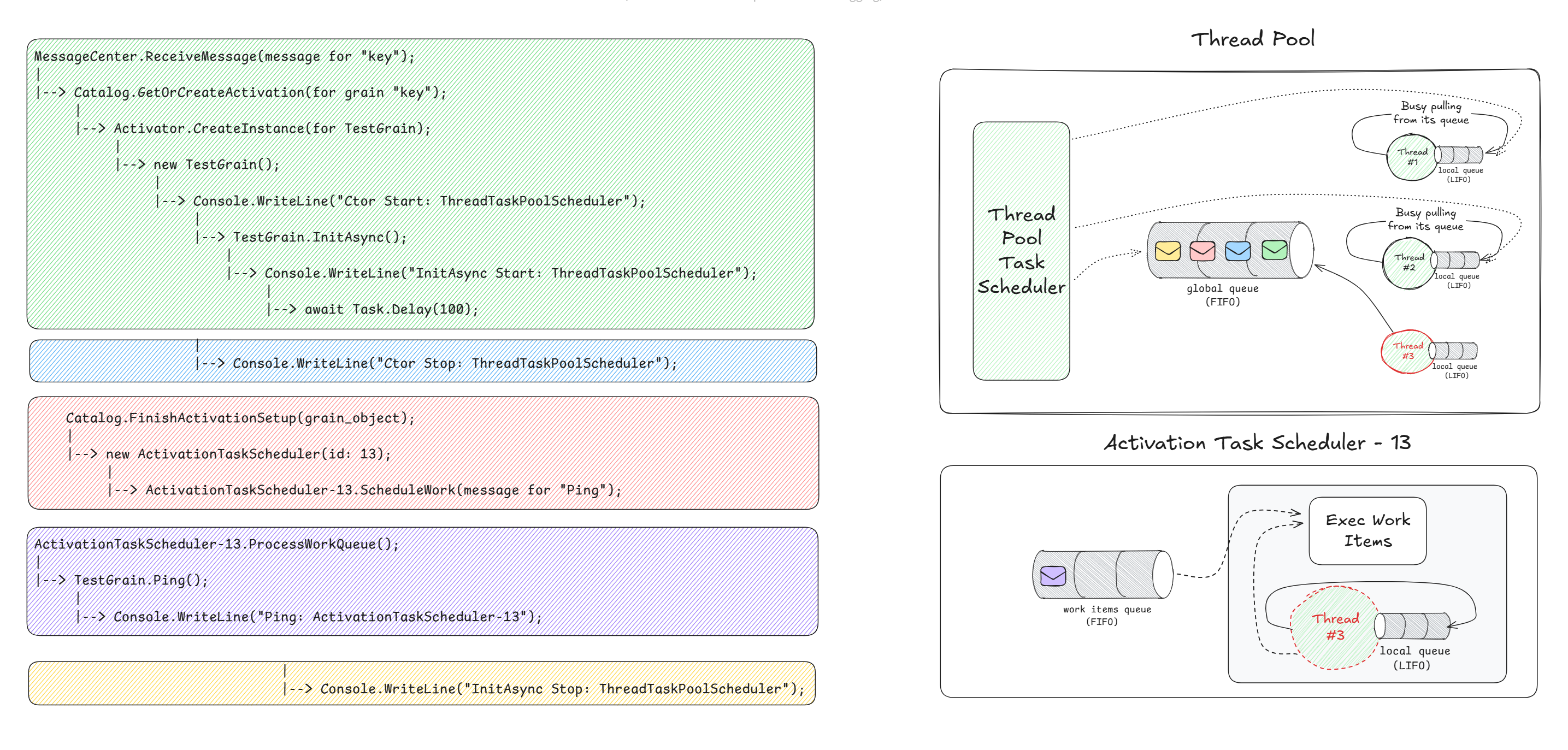
Below I have tried to visualize this flow. Focus on the coloring of the code blocks, and pay attention to the colored envelope's (representing the tasks and delegates) queued into the respective schedulers' queue. The order of the envelope's is very important, note that FIFO is the algorithm and you should read it from left to right.
I have made it look like every piece of code is queued onto the global queue of the ThreadPool, but that is just to see the ordering. In reality that is not the case!
Re-activation
We will keep the same code, but let's now deactivate the grain, and follow up by calling Ping right after that.
var grainFactory = host.Services.GetRequiredService<IGrainFactory>();
var grain = grainFactory.GetGrain<ITestGrain>("key");

await grain.Ping();
await grain.Cast<IGrainManagementExtension>().DeactivateOnIdle();
Console.WriteLine("--------------------");
await grain.Ping();
Console.WriteLine("--------------------");
We would expect to see the following printed.
Ctor Start: System.Threading.Tasks.ThreadPoolTaskScheduler
InitAsync Start: System.Threading.Tasks.ThreadPoolTaskScheduler
Ctor Stop: System.Threading.Tasks.ThreadPoolTaskScheduler
Ping: ActivationTaskScheduler-13:Queued=0
--------------------
InitAsync Stop: System.Threading.Tasks.ThreadPoolTaskScheduler
Ctor Start: System.Threading.Tasks.ThreadPoolTaskScheduler
InitAsync Start: System.Threading.Tasks.ThreadPoolTaskScheduler
Ctor Stop: System.Threading.Tasks.ThreadPoolTaskScheduler
Ping: ActivationTaskScheduler-14:Queued=0
--------------------
InitAsync Stop: System.Threading.Tasks.ThreadPoolTaskScheduler
But that is not what actually happens, instead we get this.
Ctor Start: System.Threading.Tasks.ThreadPoolTaskScheduler
InitAsync Start: System.Threading.Tasks.ThreadPoolTaskScheduler
Ctor Stop: System.Threading.Tasks.ThreadPoolTaskScheduler
Ping: ActivationTaskScheduler-13:Queued=0
--------------------
InitAsync Stop: System.Threading.Tasks.ThreadPoolTaskScheduler
Ctor Start: ActivationTaskScheduler-13:Queued=0
InitAsync Start: ActivationTaskScheduler-13:Queued=0
Ctor Stop: ActivationTaskScheduler-13:Queued=0
Ping: ActivationTaskScheduler-14:Queued=0
--------------------
[No sight of InitAsync Stop]
Note the highlighted print logs. We would have expected the constructor and InitAsync to be scheduled on the ThreadPoolTaskScheduler, but instead we can see they were scheduled on the ActivationTaskScheduler.
Weirdly InitAsync Stop: [some scheduler] was not printed at all. This means the continuation was not exectued anywhere! Note also the id of the ActivationTaskScheduler, it says 13, while the Ping method was scheduled on a different scheduler, one with id = 14.
Its all about context
Recall the activation process we talked above, this is all true. But something else, something special happens when a grain is deactivated (either manually or automatically).
The very first time a grain is activated on a silo, the entire creation process — from receiving a network message to running the grain's constructor is all scheduled on the ThreadPoolTaskScheduler. The grain's personal, single-threaded scheduler is created and assigned on the constructor, which means nothing can be scheduled on it, yet!
When a grain has received the deactivation signal, it kicks off the deactivation process asynchronously, which means that some request can slip in. In our example, when the grain receives the second ping, the activation associated with ActivationTaskScheduler-13, sees this and checks that it is currently deactivating. It proceeds to just queue the message, but not process it! This is because it is not safe to handle the message while its deactivating. Special treatment is granted to system messages, and especially grain timer requests, but that is a story for another day.
Anyhow, at some (brief) point in time, the activation will begin the deactivation process that was queued onto the grain's work loop. It proceeds to do the following, in order:
- Stops all timers.
- Calls and awaits the finalization of
OnDeactivateAsync. - Calls any registered lifecycle participants and awaits their implementation of
OnStop. - If the grain is migrating, it performs some migration duties which are not relevant here.
- If not migrated, it proceeds to unregister itself from the grain directory.
- Cancels pending operations, sets its state to
Invalid, disposes timers and the activator used to create itself, and signals lifecycle observers that it got destroyed. - Signals the work loop that it finally has deactivated.
The last point is crucial! You might be wondering why would it tell the work loop (more precisely the signaling construct that the work loop awaits on) that it has finished when it is ... well finished.
See, the work loop is the first thing that starts, way before the grain is remotely close to being "activated". The work loop never terminates, instead it is left to the GC to collect it once no references to it remain alive. A grain must handle all incoming messages, how it processes them depends on its current state.
- If the grain is not deactivated yet, messages are queued until it is.
- If deactivation fails with an exception, messages are rejected.
- If the grain has deactivated, messages are re-routed to a new activation.
This design ensures at-most-once delivery semantics for grain messages - messages are either processed by the original activation, explicitly rejected, or forwarded to a new one, but never silently dropped.
Going back to the last point in the deactivation process: Signals the work loop that it finally has deactivated.
Recall that I said, because the deactivation process is asynchronous, it can be that another request can slip in? This is what is happening with the second ping in the code above! Because the finalization of the deactivation process signals the work loop, this indirectly makes the grain check on its pending requests, and sees the second Ping request.
So you can see that the second ping is still being served (in a way) by the first activation. Of course it will not be handled by it, because I said that deactivating/deactived grains do not process messages. Rather it is the current scheduler associated with the deactivating grain that is used to schedule the second ping.
The activations' state is at this point Invalid, so its pending requests will be handled as such, which can mean two things:
- If any exception has occured during deactivation, the pending requests will be rejected.
- If no exception has occured, the pending requests will be forwarded to a new activation.
In our simple test grain, there was no exception so the second ping was forwarded to a new activation. These forwarded messages are routed via the MessageCenter, and in almost the same way like we started initially when the first activation was created.
Because placement has already ran for this activation the first time, the current silo will highly likely be picked again, since the cache will likely have an non-expired entry for it. This results in the grain being re-activated on the same silo. Again, the catalog, in-directly through an activator will literally new up a .NET object representing the grain, and feed it the same components as the first time through the constructor.
The key difference is where all this code has been scheduled!
On the first activation, it was scheduled on the ThreadPoolTaskScheduler as the MessageCenter received the message either from a gateway if its a client, or through a hosted client if within the silo.
On the second activation, it all started with the pending Ping being forwarded right from the first activation, and all the code paths were synchronous, so all of it was scheduled on the current scheduler, which is ActivationTaskScheduler, specifically the one with id = 13 a.k.a. the previous activations' scheduler.
This is why we see all: Ctor Start, InitAsync Start, Ctor Stop have been scheduled on ActivationTaskScheduler-13, as opposed to ThreadPoolTaskScheduler.
But why don't we see InitAsync Stop printed at all on the second activation?
For reference this is the code for InitAsync.
Console.WriteLine("InitAsync Start: " + TaskScheduler.Current);
await Task.Delay(100);
Console.WriteLine("InitAsync Stop: " + TaskScheduler.Current);
Because we are await(ing) a delay of 100 [ms], and since there is no ConfigureAwait(false), the await machinery captures the current context (ActivationTaskScheduler-13). InitAsync yields, and the constructor returns control immediately, having successfully created the activation object.
The second Ping request gets scheduled on ActivationTaskScheduler-14 and eventually processed by the new activation. This activation has no more pending requests, so its waiting for a new work signal pulse. This signal is only sent when a new grain message arrives, or a some operation (deactivate, migrate, etc) is scheduled.
After 100 [ms], the Task.Delay timer fires. The async machinery now needs to run the rest of the InitAsync method (InitAsync Stop: [scheduler]). It looks at the context that was captured prior to it yielding control, and esentially says: I must post this continuation as a work item to the WorkItemGroup's internal queue, through the ActivationTaskScheduler-13.
The code to print InitAsync Stop: [scheduler] is now sitting in the queue, waiting to be pumped to the ThreadPool, and eventually be executed (deep down) by an OS thread. But no work signal is being raised and the work loop is waiting for one. As I said, only grain messages and grain operations signal the work loop there is work, but things like continuations from the async machinery mean nothing to it. And so it happens that if no such work signal arrives, the continuation is in purgatory!
The ActivationTaskScheduler always enqueues continuations, but enqueueing only directly schedules execution on the ThreadPool when the WorkItemGroup is not Waiting. Normally that is fine — the runner will pick up new work, and an incoming grain message or management command can also act as the "push", because it enqueues its own work item.
However, there appears to be a small timing window where a task can be added just as the WorkItemGroup execution act (a TP thread running the pending work items) is about to mark itself Waiting, so the new task sits queued until something (typically a grain message) nudges it (the continuation). There won't be one though as the activation associated with scheduler 13 has deactivated.
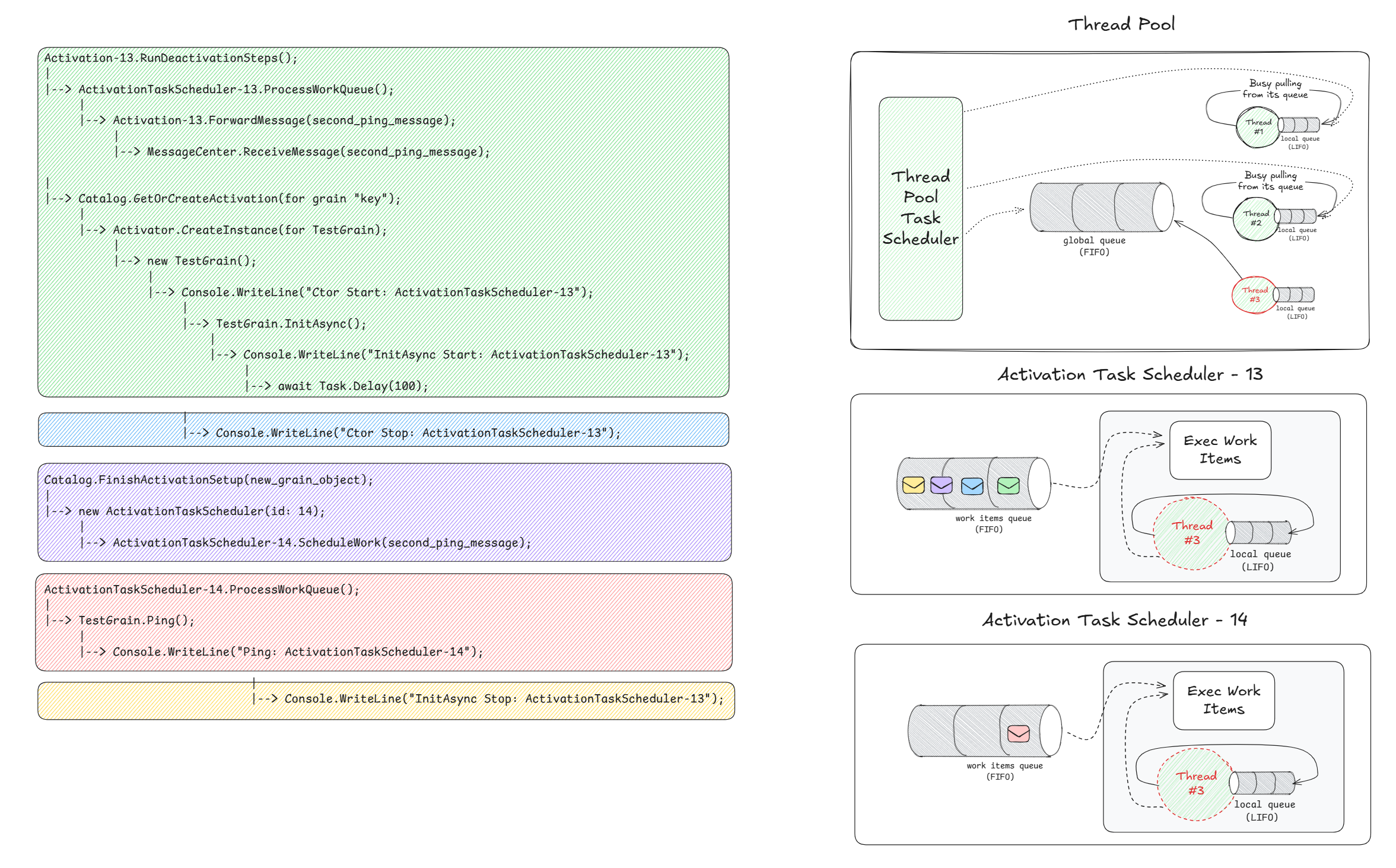
Again, pay attention to the code block coloring, the envelope's coloring, and their ordering (from left to right). Note how most of the work is being scheduled on ActivationTaskScheduler-13, as opposed to ThreadPoolTaskScheduler.
This can even deadlock the grain if we instead synchronously wait on InitAsync within the constructor. Doing the following change to the grain's constructor.
public TestGrain()
{
    Console.WriteLine("Ctor Start: " + TaskScheduler.Current);
    // _ = InitAsync();                   // Before
    InitAsync().GetAwaiter().GetResult(); // After
    Console.WriteLine("Ctor Stop: " + TaskScheduler.Current);
}
Will print the following.
Ctor Start: System.Threading.Tasks.ThreadPoolTaskScheduler
InitAsync Start: System.Threading.Tasks.ThreadPoolTaskScheduler
InitAsync Stop: System.Threading.Tasks.ThreadPoolTaskScheduler
Ctor Stop: System.Threading.Tasks.ThreadPoolTaskScheduler
Ping: ActivationTaskScheduler-13:Queued=0
--------------------
Ctor Start: ActivationTaskScheduler-13:Queued=0
InitAsync Start: ActivationTaskScheduler-13:Queued=0
[No sight of Ctor Stop]
[No sight of Ping]
--------------------
[No sight of InitAsync Stop]
The same behavior is exhibited until InitAsync Start has finished, and contrary to doing a fire-and-forget of InitAsync, this time we are waiting on the completion of InitAsync. For the same reason why InitAsync Stop: [scheduler] was not printed in the second activation of the first example, this time, not only does the continuation of InitAsync not run, but even worse the second Ping is not executed either.
The continuation is waiting, and the constructor is waiting on the continuation to be executed. Since the constructor is waiting, the activation object itself won't be created, so neither can the activation start, which means the second Ping can not be executed either, boom deadlock!
We are good developers and we do not synchronously wait on asynchronous code, but lets entertain this further and see how we can force the continuation to be executed.
ConfigureAwait(false)
This comes straight from the Orleans docs:
Generally, never use ConfigureAwait(false) directly in grain code.
That is true, but we know what we are doing and proceed against the guidelines. Because by default awaitable's will capture the current scheduler (and synchronization context, but that's besides the point) - await Task.Delay(100) will capture the activation scheduler, so by simply telling the async machinery to not capture the scheduler, we can escape the whole thing.
private async Task InitAsync()
{
    Console.WriteLine("InitAsync Start: " + TaskScheduler.Current);
    // await Task.Delay(100);                    // Before
    await Task.Delay(100).ConfigureAwait(false); // After
    Console.WriteLine("InitAsync Stop: " + TaskScheduler.Current);
}
As we can see the continuation will be scheduled on the ThreadPoolTaskScheduler, so it does not need to wait for a grain message to trigger its execution.
Ctor Start: System.Threading.Tasks.ThreadPoolTaskScheduler
InitAsync Start: System.Threading.Tasks.ThreadPoolTaskScheduler
Ctor Stop: System.Threading.Tasks.ThreadPoolTaskScheduler
Ping: ActivationTaskScheduler-13:Queued=0
--------------------
InitAsync Stop: System.Threading.Tasks.ThreadPoolTaskScheduler
Ctor Start: ActivationTaskScheduler-13:Queued=0
InitAsync Start: ActivationTaskScheduler-13:Queued=0
Ctor Stop: ActivationTaskScheduler-13:Queued=0
Ping: ActivationTaskScheduler-14:Queued=0
--------------------

InitAsync Stop: System.Threading.Tasks.ThreadPoolTaskScheduler
Again, pay attention to the code block coloring, the envelope's coloring, and their ordering (from left to right).
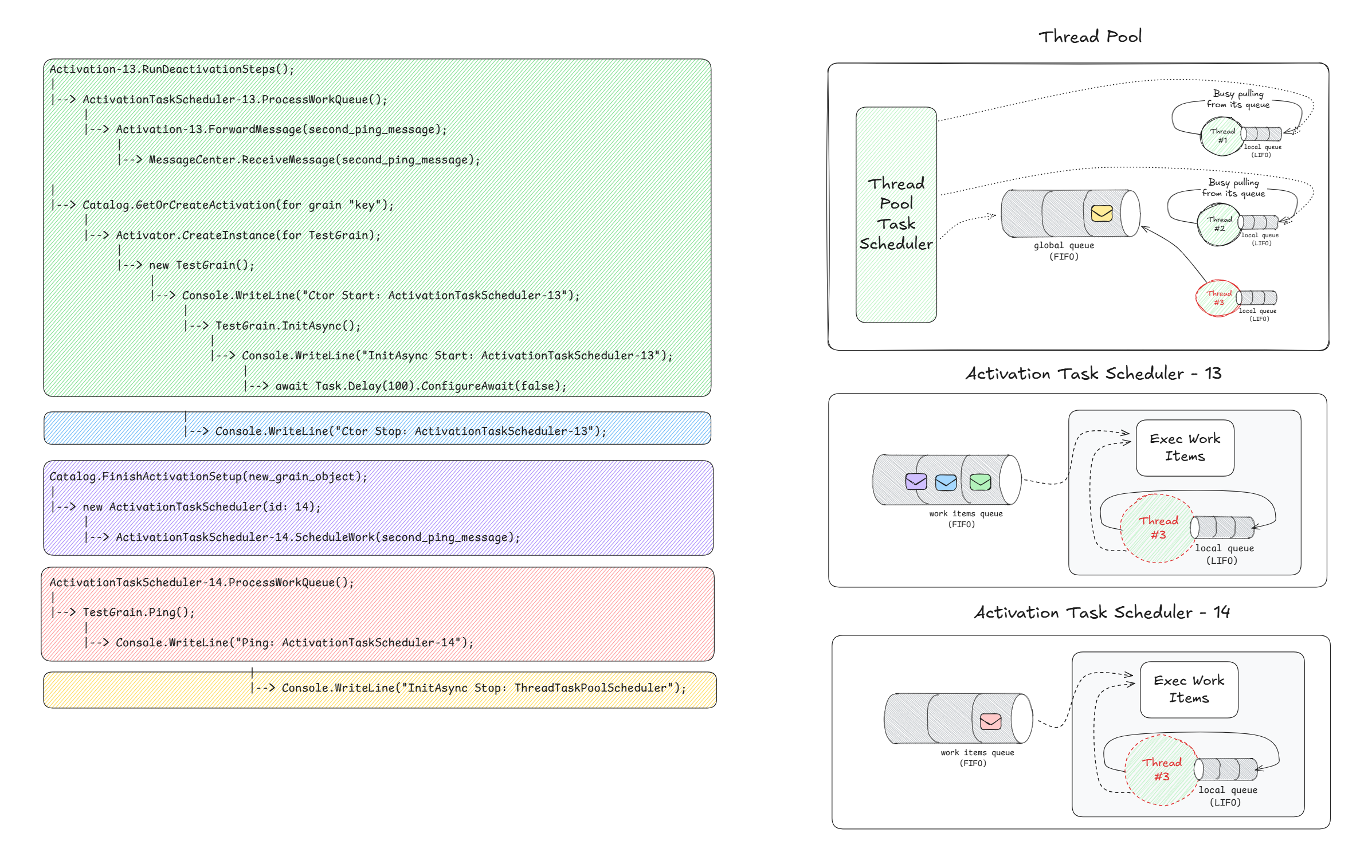
This of course can be problematic, because if the continuation modified the grain's state, we would end up loosing the single-threaded guarantee.
OnActivateAsync
Because this article is geared towards seasoned users of Orleans, it should not come as a surprise to see that the right thing to do is to run asynchronous code inside OnActivateAsync. Doing the following change.
public class TestGrain : Grain, ITestGrain
{
    public override async Task OnActivateAsync(CancellationToken cancellationToken)
    {
        Console.WriteLine("OnActivateAsync Start: " + TaskScheduler.Current);
        await InitAsync();
        Console.WriteLine("OnActivateAsync Start: " + TaskScheduler.Current);
    }

    private async Task InitAsync()
    {
        Console.WriteLine("InitAsync Start: " + TaskScheduler.Current);
        await Task.Delay(100);
        Console.WriteLine("InitAsync Stop: " + TaskScheduler.Current);
    }

    public Task Ping()
    {
        Console.WriteLine("Ping: " + TaskScheduler.Current);
        return Task.CompletedTask;
    }
}
Will print the following.
OnActivateAsync Start: ActivationTaskScheduler-13:Queued=0
InitAsync Start: ActivationTaskScheduler-13:Queued=0
InitAsync Stop: ActivationTaskScheduler-13:Queued=0
OnActivateAsync Start: ActivationTaskScheduler-13:Queued=0
Ping: ActivationTaskScheduler-13:Queued=0
--------------------
OnActivateAsync Start: ActivationTaskScheduler-14:Queued=0
InitAsync Start: ActivationTaskScheduler-14:Queued=0
InitAsync Stop: ActivationTaskScheduler-14:Queued=0
OnActivateAsync Start: ActivationTaskScheduler-14:Queued=0
Ping: ActivationTaskScheduler-14:Queued=0
--------------------
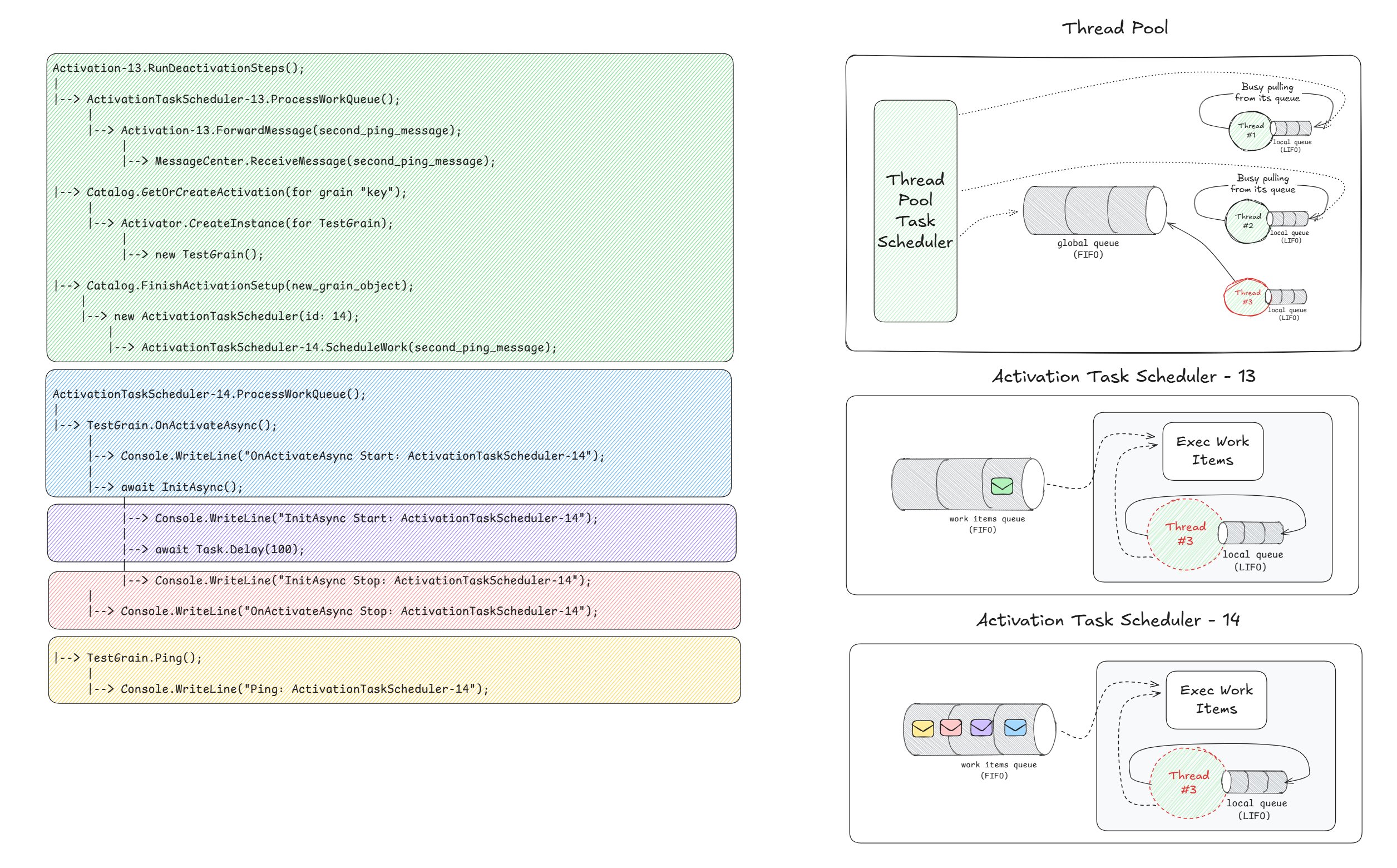
Here the initialization runs entirely within the grain's scheduler, after the activation is fully created. This ensures InitAsync and its continuations execute in the correct single-threaded context, preserving Orleans' scheduling, not having continuations in purgatory state, and even avoiding deadlocks.
Again, pay attention to the code block coloring, the envelope's coloring, and their ordering (from left to right). Note how most of the work is being scheduled on ActivationTaskScheduler-14, as opposed to ActivationTaskScheduler-13.
When it matters
This behavior was trivial demonstrated via the TestGrain, but readers can raise up a concern.
Its not recommended to run asynchronous code inside the constructor, even in a fire-and-forget fashion.
While it is generally discouraged to do so, there are valid scenarios where background work must begin early in an object's lifetime, even before activation has completed. For example, a worker component could become a participant in the grain's lifecycle, and may need to spin up a continuous processing loop that handles queued work items independently of any grain request.
In such cases, launching the loop immediately ensures readiness, therefore allowing the grain to delegate tasks, but more importantly to keep the parent grain responsive to incoming requests. The key difference is intent and control: this background work is not initializing any state, but establishing a self-contained "thing" that runs alongside the parent grain.
Below I have shown an example grain that triggers (normally we would be pushing, but besides the point) some work into the WorkPump. The WorkerGrain exposes two methods: ExecuteWork, which enqueues a new task to the pump, and PollResult, which allows clients to check whether the result is ready. PollResult always interleaves, and this is crucial to understanding the impacts of the schedulers we were elaborating till now.
The WorkPump itself manages an internal channel of pending tasks and continuously processes them within its work loop. Each enqueued job simulates CPU-bound work by generating a random hex string after a brief sleep duration on the current thread, while lifecycle participation ensures that the pump starts alongside the grain, and stops when the grain deactivates.
public interface IWorkerGrain : IGrainWithStringKey
{
    Task ExecuteWork();
    [AlwaysInterleave] Task<string?> PollResult();
}

public class WorkerGrain : Grain, IWorkerGrain
{
    private string? _lastResult;
    private readonly WorkPump _runner;

    public WorkerGrain(WorkPump worker)
    {
        _runner = worker;
        worker.Participate(((IGrainBase)this).GrainContext.ObservableLifecycle);
    }

    public Task<string?> PollResult() => Task.FromResult(_lastResult);

    public async Task ExecuteWork()
    {
        var result = await _runner.PumpWork();
        _lastResult = result;
    }
}

public class WorkPump : ILifecycleParticipant<IGrainLifecycle>, ILifecycleObserver
{
    private readonly Task _workLoop;
    private readonly Guid _instanceId = Guid.NewGuid();
    private readonly Channel<TaskCompletionSource<string>> _workQueue =
        Channel.CreateUnbounded<TaskCompletionSource<string>>();

    public WorkPump()
    {
        Console.WriteLine($"[WORKER] - Ctor on: {TaskScheduler.Current}");
        // Just like in the TestGrain example,
        // we start some async work and dont await it.
        _workLoop = Start();
    }

    private Task Start()
    {
        using var suppressor = new ExecutionContextSuppressor();
        return WorkLoop();
    }

    private async Task WorkLoop()
    {
        await Task.CompletedTask.ConfigureAwait(
            ConfigureAwaitOptions.ContinueOnCapturedContext |
            ConfigureAwaitOptions.ForceYielding);

        Console.WriteLine($"[WORKER] - WorkLoop on: {TaskScheduler.Current}");

        await foreach (var tcs in _workQueue.Reader.ReadAllAsync())
        {
            try
            {
                var result = DoWork();
                tcs.SetResult(result);
            }
            catch (Exception e)
            {
                tcs.SetException(e);
            }
        }

        static string DoWork()
        {
            const int WorkDuration = 1_000;

            Console.WriteLine($"[WORKER] - Doing CPU work for {WorkDuration} [ms] on: {TaskScheduler.Current}");
            Thread.Sleep(WorkDuration);
            var result = Convert.ToHexString(RandomNumberGenerator.GetBytes(16));

            return result;
        }
    }

    public Task<string> PumpWork()
    {
        var tcs = new TaskCompletionSource<string>(TaskCreationOptions.RunContinuationsAsynchronously);
        _workQueue.Writer.TryWrite(tcs);

        return tcs.Task;
    }

    public void Participate(IGrainLifecycle lifecycle) => lifecycle.Subscribe(GrainLifecycleStage.SetupState, this);
    public Task OnStart(CancellationToken ct) => Task.CompletedTask;
    public Task OnStop(CancellationToken ct)
    {
        _workQueue.Writer.TryComplete();
        return _workLoop;
    }
}
In this setup, we simulate a client invoking a grain's background processing twice. We do an explicit deactivation between runs to observe the lifecycle effects. Each iteration enqueues a CPU-bound job in the grain's work pump and then polls until the result becomes available, giving the background loop time to process.
var grainFactory = host.Services.GetRequiredService<IGrainFactory>();
var grain = grainFactory.GetGrain<IWorkerGrain>("key");

await RunTestIteration("FIRST ACTIVATION", grain);
Console.WriteLine("\n--- DEACTIVATING GRAIN ---");
await grain.Cast<IGrainManagementExtension>().DeactivateOnIdle();
await RunTestIteration("SECOND ACTIVATION", grain);

async Task RunTestIteration(string description, IWorkerGrain grain)
{
    Console.WriteLine($"\n--- {description} ---");

    Console.WriteLine("[CLIENT] - Calling ExecuteWork");
    grain.ExecuteWork().Ignore();

    // We give the grain some time to get running and start the work loop.
    await Task.Delay(500);

    int i = 0;
    string? result = null;

    while (result is null)
    {
        var stopwatch = Stopwatch.StartNew();
        Console.Write($"[CLIENT] - Polling result...");
        result = await grain.PollResult();
        stopwatch.Stop();
        Console.WriteLine($" Completed in {stopwatch.ElapsedTicks:N0} [ticks] - Result: {(result ?? "Unvailable")}");
        await Task.Delay(100);
        i++;
    }
}
The following gets printed.
--- FIRST ACTIVATION ---
[CLIENT] - Calling ExecuteWork
[WORKER] - Ctor on: System.Threading.Tasks.ThreadPoolTaskScheduler
[WORKER] - WorkLoop on: System.Threading.Tasks.ThreadPoolTaskScheduler
[WORKER] - Doing CPU work for 1000 [ms] on: System.Threading.Tasks.ThreadPoolTaskScheduler
[CLIENT] - Polling result... Completed in 39,141 [ticks] - Result: Unvailable
[CLIENT] - Polling result... Completed in 4,321 [ticks] - Result: Unvailable
[CLIENT] - Polling result... Completed in 3,057 [ticks] - Result: Unvailable
[CLIENT] - Polling result... Completed in 3,975 [ticks] - Result: Unvailable
[CLIENT] - Polling result... Completed in 3,986 [ticks] - Result: Unvailable
[CLIENT] - Polling result... Completed in 3,433 [ticks] - Result: Unvailable
[CLIENT] - Polling result... Completed in 2,823 [ticks] - Result: Unvailable
[CLIENT] - Polling result... Completed in 3,803 [ticks] - Result: 3573FA4CBE09449D28F533D856B2CCD2

--- DEACTIVATING GRAIN ---

--- SECOND ACTIVATION ---
[CLIENT] - Calling ExecuteWork
[WORKER] - Ctor on: ActivationTaskScheduler-13:Queued=0
[WORKER] - WorkLoop on: ActivationTaskScheduler-13:Queued=0
[WORKER] - Doing CPU work for 1000 [ms] on: ActivationTaskScheduler-13:Queued=0
[CLIENT] - Polling result... Completed in 2,940 [ticks] - Result: A38F437F17C203E4076A9BBE6B97F7CA
During the first activation, the WorkPump constructor thereby the WorkLoop task turns are scheduled on the ThreadPoolTaskScheduler, meaning the work items are independently scheduled from the grain's scheduler. The client polls multiple times before the result is returned, showing that the background work is detached.
Ignore the fact that the first poll took longer than the rest. This is because it was the first ever request hitting the grain, so there was some initialization work to be done. This is not related to what we are talking about!
In the second activation, after deactivation and reactivation, the loop task turns are scheduled on ActivationTaskScheduler-13. Calls from the client to poll the result can not interleave because the activation scheduler is busy with the work loop task which is blocking the grain. Note that only one "Polling result..." is printed on the second run, demonstrating that without detachment the work turns are scheduled directly on the grain's scheduler, therefore hijacking it.
If you have followed closely thus far, you can clearly understand why this is happening, and the solution is trivial: explicitly schedule the work loop task on the ThreadPoolTaskScheduler. The most straight-forward and correct way is to use Task.Run(). Do not look too much into the suppression of the ExecutionContext, it is a good idea in scenarios like this because it prevents ambient context data from flowing into the background task, but it makes no difference to the main point.
private Task Start()
{
    using var suppressor = new ExecutionContextSuppressor();
    //return WorkLoop();       // Before
    return Task.Run(WorkLoop); // After
}
After we run the same testing scenario, the following gets printed.
--- FIRST ACTIVATION ---
[CLIENT] - Calling ExecuteWork
[WORKER] - Ctor on: System.Threading.Tasks.ThreadPoolTaskScheduler
[WORKER] - WorkLoop on: System.Threading.Tasks.ThreadPoolTaskScheduler
[WORKER] - Doing CPU work for 1000 [ms] on: System.Threading.Tasks.ThreadPoolTaskScheduler
[CLIENT] - Polling result... Completed in 41,889 [ticks] - Result: Unvailable
[CLIENT] - Polling result... Completed in 5,602 [ticks] - Result: Unvailable
[CLIENT] - Polling result... Completed in 3,475 [ticks] - Result: Unvailable
[CLIENT] - Polling result... Completed in 3,343 [ticks] - Result: Unvailable
[CLIENT] - Polling result... Completed in 3,012 [ticks] - Result: Unvailable
[CLIENT] - Polling result... Completed in 2,781 [ticks] - Result: Unvailable
[CLIENT] - Polling result... Completed in 4,010 [ticks] - Result: Unvailable
[CLIENT] - Polling result... Completed in 3,370 [ticks] - Result: C9565EF3BFA1261612A094881B097C3A

--- DEACTIVATING GRAIN ---

--- SECOND ACTIVATION ---
[CLIENT] - Calling ExecuteWork
[WORKER] - Ctor on: ActivationTaskScheduler-13:Queued=0
[WORKER] - WorkLoop on: System.Threading.Tasks.ThreadPoolTaskScheduler
[WORKER] - Doing CPU work for 1000 [ms] on: System.Threading.Tasks.ThreadPoolTaskScheduler
[CLIENT] - Polling result... Completed in 3,652 [ticks] - Result: Unvailable
[CLIENT] - Polling result... Completed in 4,759 [ticks] - Result: Unvailable
[CLIENT] - Polling result... Completed in 3,576 [ticks] - Result: Unvailable
[CLIENT] - Polling result... Completed in 3,470 [ticks] - Result: Unvailable
[CLIENT] - Polling result... Completed in 2,906 [ticks] - Result: Unvailable
[CLIENT] - Polling result... Completed in 3,598 [ticks] - Result: Unvailable
[CLIENT] - Polling result... Completed in 3,708 [ticks] - Result: 090FB837197C0BF55823DBCD850AF9AB
After explicitly scheduling the WorkLoop on the ThreadPoolTaskScheduler, the behavior changes noticeably. During the first activation, everything works the same way as in the previous example when we did not explicitly schedule the loop turns on ThreadPoolTaskScheduler.
Again, ignore the fact that the first poll took longer than the rest. It is the same reason as above!
But during the second activation, even though the grain is reactivated on ActivationTaskScheduler-13, the work loop turns continue to be scheduled on the ThreadPoolTaskScheduler rather than the grain's ActivationTaskScheduler-13.
This means that the background work is no longer hijacking the grain's scheduler, keeping the grain responsive to incoming requests (note multiple polls were executed), while the CPU-bound work proceeds independently.
If you found this article helpful please give it a share in your favorite forums 😉.